Battery Charging Animation
- 4.8
- Rating
- 1.00M
- Installs
- Free
- Price
 Analysis by App-foxy
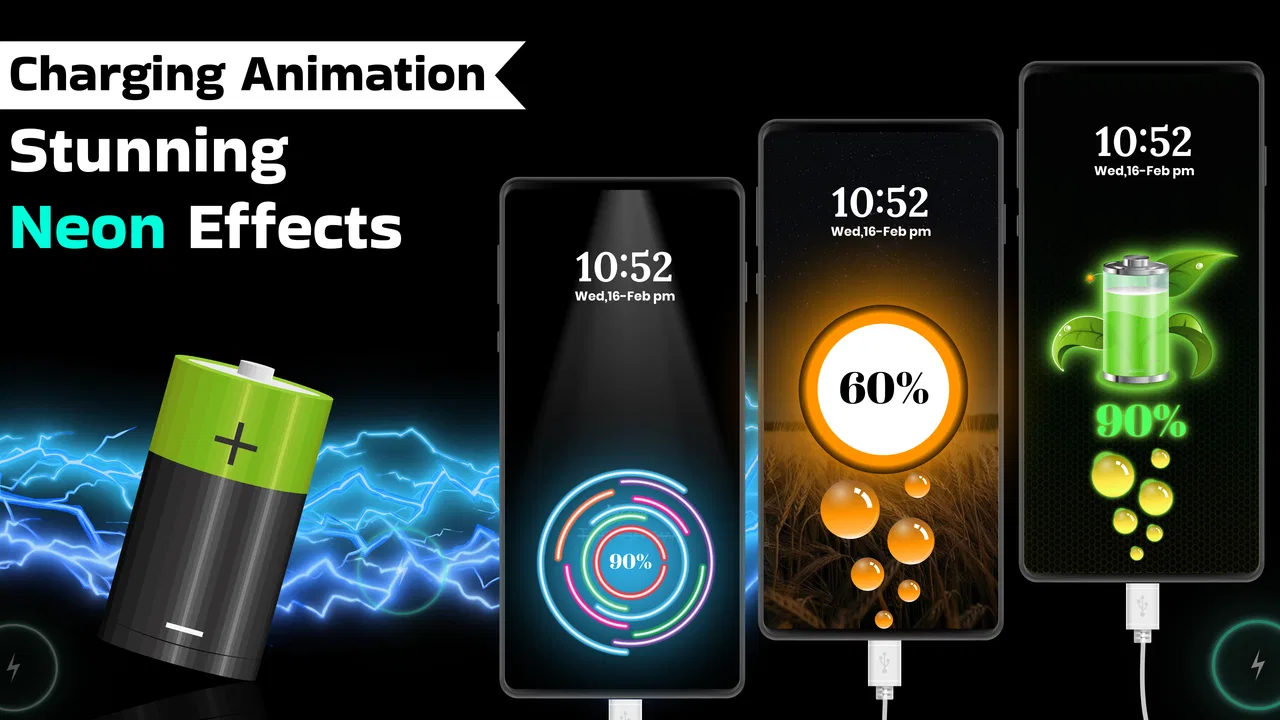
I tried Battery Charging Animation as a small personalization tool rather than expecting it to transform the way my phone works. Its purpose is simple: it adds visual effects to the charging moment, turning an otherwise easy-to-ignore system event into something more noticeable and entertaining. That narrow focus is both its appeal and its main limitation. If you enjoy customizing the look and feel of your phone, it can make plugging in feel more personal. If you want deeper battery management, charging diagnostics, or meaningful improvements to battery life, this is not the app I would choose.
The app comes from Hifi Studio and sits in the personalization category. It is free to install, although individual in-app purchases range from around nine to twenty dollars. It is suitable for Everyone, and its current release is version five point six point three for devices running Android nine or later. The app has passed the point of being a niche experiment: it has more than a million installs and holds a four point eight average from roughly fourteen thousand ratings. Those figures suggest that the basic idea connects with a large audience, but they do not remove the need to decide whether animated charging is useful for your own routine.
What the charging experience feels like in everyday use
The first thing I noticed is that the app is built around presentation, not utility. A charging animation can make the lock screen or charging screen feel less static, especially if you regularly charge your phone at a desk, beside your bed, or in the car. It is a small visual reward when the cable is connected. For someone who already changes wallpapers, icons, widgets, or notification styles, this fits naturally into the same habit of making a phone feel less generic.
You May Also Like

 Blood Strike: 2.5 Anniversary
Blood Strike’s Loadouts Turn Every Drop Into a Tactical Gamble
A close look at Blood Strike’s custom loadouts: how fast access to signature weapons reshapes its battle royale rhythm, rewards preparation, and narrows the gap between fights.

 Pandora - Music & Podcasts
Pandora’s Music Is Easy to Start, but Harder to Recover
Pandora’s strength is its low-effort path from a seed to a station. Its weak spot is how much confidence it asks you to place in connection, setup, and quiet recovery.

 8 Ball Pool
 Is Built on Rivalries, Rematches, and Routine
A close look at the rivalries, rematches, shared routines, and unanswered safety questions that turn a quick pool match into a persistent mobile community.

 Samsung Music
’s Quiet Strength Is Playing What You Already Own
Its reach comes less from spectacle than from dependable access to a personal library. That simplicity is both the app’s strongest retention engine and its ceiling.

 AccuWeather: Weather Radar
AccuWeather Review: A Quick, Clear Forecast for Everyday Decisions
For everyday plans, the best forecast is the one you can understand quickly. AccuWeather makes rain timing, radar, and local conditions easy to act on, with a few trade-offs.

 Hill Climb Racing
Why Hill Climb Racing Still Turns Crashes Into One More Run
A tiny car, a bumpy hill and one more upgrade: Hill Climb Racing keeps resurfacing because its simple chaos makes every near-miss feel personal.
More From Our News Desk



A realistic example is my evening routine: I connect the phone before going to sleep, glance at the screen to confirm that charging has started, and then put it down. With this kind of app, that confirmation becomes more visually obvious than the usual battery indicator. During the day, the effect can also be handy when I connect a phone to a power bank and want a quick visual cue that the connection registered. The animation does not make the battery fill faster, but it can make the charging event easier to notice.
That distinction matters. Battery Charging Animation does not replace the normal battery settings on the phone, and I would not treat its graphics as a battery-health tool. The system battery screen remains the better place to check percentage, usage, and other device information. This app is for atmosphere and visibility. Its value depends on whether you enjoy that extra layer of presentation.
I also found that the right effect depends heavily on context. A lively animation may be fun when showing the phone to someone or when customizing a new device, but it can become distracting if the phone is charging on a nightstand. I would start with a restrained visual style, use it for a few charging cycles, and only then decide whether a more dramatic option is worth keeping. Personalization works best when it supports a routine instead of demanding attention from it.
Who will get the most from it
This is a good match for people who like visible customization and want a quick change without replacing their launcher or rebuilding their entire home screen. It can also suit younger users who enjoy playful phone effects, families sharing devices, or anyone who wants a more recognizable charging cue. Because the content rating is Everyone, it is presented as an app suitable for a broad audience, though parents should still review the available choices and purchase flow before handing the device to a child.
I would be more cautious about recommending it to someone who keeps a phone on silent, uses a minimalist setup, or sees every extra animation as clutter. The same effect that feels cheerful on one device may look unnecessary on another. People with older or less responsive phones may also prefer to keep the interface as light as possible, even though the app’s main job is visual rather than computational. In that situation, the built-in charging display is the cleaner alternative.
Setup decisions that deserve attention
The important part of using a charging-animation app is not simply choosing the most impressive effect. It is deciding how visible and persistent you want the experience to be. I recommend checking the app’s available controls carefully during setup instead of accepting every prompt automatically. Look for choices about when the animation appears, how it behaves after the cable is connected, and whether it can be adjusted or disabled. The best setup is one that gives you a clear charging confirmation without taking over the screen.
I would also test the app with the phone both unlocked and locked. Charging behavior can feel different depending on the device interface, manufacturer software, and screen settings. A design that looks good while browsing may be too bright at night. Testing it in the places where you actually charge—desk, bedroom, car, and power bank—gives a more honest impression than judging it once in ideal conditions.
Another practical tip is to keep the phone’s normal battery indicator in mind. If the animation is decorative but the percentage is difficult to read, the visual upgrade is not worth much. I prefer an effect that confirms the connection quickly and then gets out of the way. That is especially important when I am in a hurry and only need to know whether the cable is seated properly.
Trust, permissions, and control while using the app
For a personalization app, trust comes from being able to understand and control what it does. Battery Charging Animation should be judged through the permission prompts, settings, and choices visible on the device rather than through assumptions about its behavior. I do not treat an attractive animation as a reason to grant broad access automatically. When installing any app that changes what appears during charging, I read each request and consider whether it is necessary for the feature I want.
The safest approach is straightforward: grant only the access Android clearly identifies as needed, decline anything unrelated to charging visuals, and revisit the app’s permissions later if the phone offers that option. If a prompt is unclear, I pause instead of tapping through it. This is not unique to Hifi Studio, but it is particularly relevant here because the app’s purpose is narrow. A narrow purpose deserves equally clear boundaries from the user’s side.
I also look for visible controls that let me change my mind. Can the animation be turned off? Can the app be removed without leaving an unwanted replacement for the standard charging screen? Can I stop using a particular effect without uninstalling everything? These are practical signs of user agency. I prefer tools that let me experiment freely and return to the default experience without friction.
Data-sensitive moments often happen outside the animation itself. Installing the app, responding to permission dialogs, opening purchase screens, and allowing notifications are all moments when I slow down. I avoid entering payment details just to explore a visual option, and I check the purchase screen carefully before confirming anything. Since the app is free to install but includes paid items, the difference between trying the basic experience and buying extra content should remain clear to the person holding the phone.
That pricing model changes how I evaluate the app. The free entry point makes experimentation easy, but the paid range means I would not assume every visual choice is included. I would first decide whether the basic version adds enough enjoyment to justify keeping it. Only after using it in a normal routine would I consider a purchase. For me, an animation is a small convenience or decoration, so I would expect the paid choices to offer a clearly different experience rather than merely a minor variation.
Keeping control over attention and battery habits
One of the less obvious trade-offs is attention. A charging animation can help confirm that a cable is connected, but it can also encourage unnecessary screen checks. If I find myself repeatedly picking up the phone to watch the effect, the feature has started working against my routine. I would then shorten the time I spend looking at it, choose a quieter design, or return to the standard system display.
I would make the same distinction with battery expectations. The app makes charging more visually engaging, but it should not be confused with a tool that improves battery capacity or charging speed. A phone may still charge slowly because of its adapter, cable, temperature, background activity, or hardware. When charging performance is the concern, I would troubleshoot those causes through the phone’s settings and accessories instead of expecting an animation app to solve them.
There is also a useful privacy habit here: review the app after a major phone update. Android and manufacturer interfaces can change how charging screens, overlays, and notifications behave. If the app asks for a permission again or its appearance changes, I would inspect the new choice rather than assuming the previous setup still applies. That small check keeps the user in control as the device evolves.
How it compares with built-in options and other personalization tools
The built-in charging display is the strongest alternative because it is already integrated with the phone and usually requires no extra setup. It is the better choice for anyone who values simplicity, predictable behavior, and a clean lock screen. It also avoids the question of whether a separate app adds more visual complexity than the feature is worth.
Full launcher and theme apps offer much broader customization. They can change icons, wallpapers, widgets, and sometimes system colors, making them more suitable for someone who wants a complete visual redesign. The trade-off is time and complexity. Battery Charging Animation is more focused: it changes one moment of phone use instead of asking me to rebuild the entire interface. That makes it easier to try, but also means its usefulness is limited to charging situations.
Battery-monitoring apps are another different category. They are preferable when the real question is why the phone drains quickly, how long charging takes, or which apps consume power. Battery Charging Animation does not occupy that role in my evaluation. Its strength is emotional and visual rather than analytical. Choosing between the two depends on whether the problem is boredom with the charging screen or concern about battery performance.
I would skip this app if my priority were maximum minimalism, detailed battery statistics, or a completely distraction-free night setup. I would also avoid paying for extra effects before confirming that the free experience fits my device and routine. On the other hand, I would consider it worthwhile for a user who enjoys small interface details and wants charging to feel more distinctive without committing to a full theme overhaul.
My final view after weighing the trade-offs
Battery Charging Animation succeeds because it does not pretend to be more than a personalization app. It takes a brief, ordinary action and gives it a visual identity. For the right person, that is enough: the phone feels more playful, the charging connection is easier to notice, and the setup is less involved than changing the whole interface.
My recommendation comes with a clear condition: keep your expectations focused on appearance. Do not install it for faster charging, battery-health answers, or advanced power management. Before using it regularly, inspect every permission and visible setting, test the effect in both daytime and nighttime conditions, and confirm that the purchase screen is understandable. Those steps make the experience more comfortable and reduce the chance that a decorative feature becomes an unwanted distraction.
Overall, I see the app as a pleasant optional layer for Android users who enjoy customization. Its strong user response and broad reach make it easy to understand why it has attracted attention, while its focused purpose explains why it will not appeal to everyone. The best reason to use it is simple: you want charging to look more personal, and you are comfortable keeping that visual change under your control. If that sounds like you, the free starting point makes it reasonable to try. If you prefer the phone to stay quiet and functional, the built-in charging screen remains the better choice.
FAQs for Battery Charging Animation
01What is Battery Charging Animation and how does it work?
Battery Charging Animation is an app that displays animated visual effects, charging screens, wallpapers, or themed graphics when your phone is connected to a charger. After installation, you typically choose an animation style and enable the required settings. Depending on your device, the animation may appear automatically during charging or require the app to remain active in the background.
02Does Battery Charging Animation drain battery or affect charging speed?
The app is mainly designed for visual customization, so it should not significantly change the actual charging speed or battery capacity. However, animated effects can keep the screen awake and may use additional power, especially on phones with bright displays. If battery consumption becomes noticeable, reduce the animation duration, disable sound and vibration, or allow the screen to turn off normally.
03What permissions does Battery Charging Animation require?
The permissions depend on the version and features available, but the app may request permission to display over other applications, show notifications, run when the device is charging, or start automatically after reboot. These permissions allow the charging animation to appear at the right time. Before accepting them, review the explanations carefully and disable any access that is unnecessary.
04Can Battery Charging Animation work on every Android or iPhone model?
Compatibility can vary considerably between devices, operating-system versions, and manufacturer interfaces. Some Android phones may restrict background activity or overlay features, while iPhones generally provide less flexibility for automatically replacing system charging screens. The app may still offer shortcuts, notifications, or themed content on unsupported devices, but the complete animation experience is not guaranteed on every model.
05Is Battery Charging Animation free, and are there advertisements or in-app purchases?
Battery Charging Animation may be available as a free download, but the exact business model can differ between versions and platforms. Free editions often include advertisements, limited animation packs, or optional purchases for premium themes and extra customization tools. Check the store listing before downloading to confirm pricing, subscription details, advertising, and whether the features you want are included without additional payment.
Pros
- Offers eye-catching charging effects that make the lock screen feel more dynamic.
- Includes multiple animation styles for matching different tastes and wallpapers.
- Can make charging status easier to notice at a glance.
- Simple interface lets users preview and apply effects quickly.
- Adds a decorative touch without changing the phone’s core charging process.
Cons
- Some effects may feel repetitive after extended use.
- Animations can be distracting in dark rooms or during overnight charging.
- Certain features may require watching ads or making in-app purchases.
- Compatibility may vary across Android brands and customized interfaces.
- Extra visual effects could slightly increase battery and memory usage.

Battery Charging Animation
Gallery